
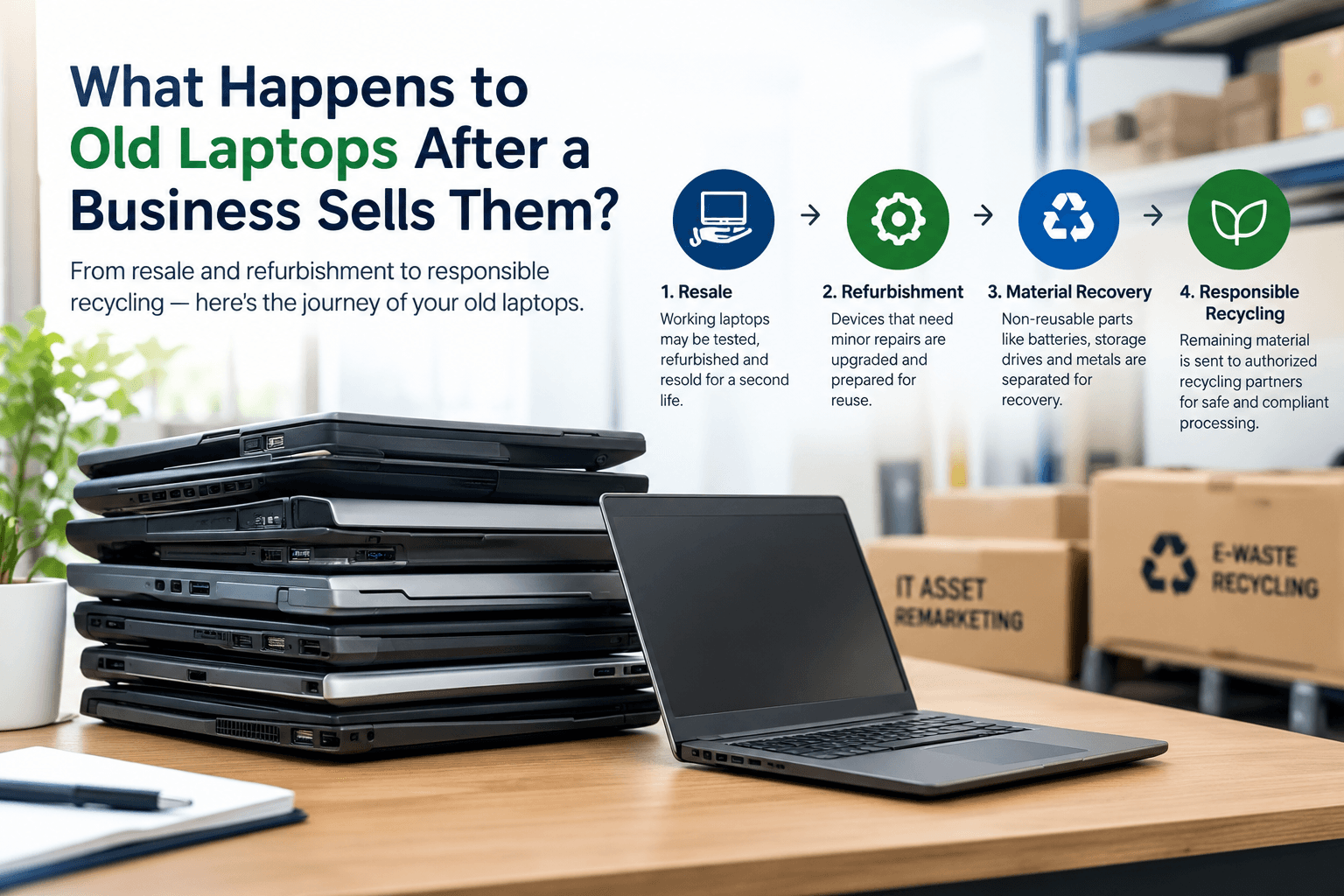
When a company replaces 50, 100 or even 1,000 laptops, the disposal process does not necessarily end when the laptops are collected.
Depending on their condition, age, data status and recovery potential, old business laptops can follow several different routes. Some may be suitable for reuse or refurbishment. Others may be dismantled for component and material recovery. Devices that are no longer economically recoverable can enter appropriate e-waste recycling channels.
For businesses, understanding what happens after collection is useful because it explains why condition, data handling, documentation and proper segregation matter before an asset is sold.
1. The First Step: Collection and Inventory
After a business confirms a laptop lot for disposal or procurement, the first step is usually collection.
The laptops may come from:
- Corporate offices
- IT departments
- Employee refresh programs
- Warehouses
- Data centers
- Educational institutions
- Branch offices
- Project closures
- Business shutdowns
For a bulk lot, the equipment should ideally be accompanied by basic information such as:
- Laptop make and model
- Quantity
- Serial number or asset ID, where available
- Working/non-working condition
- Location
- Missing accessories
- Battery condition
The purpose is to establish what has actually been transferred.
Why inventory matters
A company may believe it has 200 old laptops, but the actual lot could contain:
- 80 working laptops
- 50 repairable laptops
- 40 damaged laptops
- 20 units missing batteries
- 10 units suitable mainly for material recovery
These assets should not necessarily be treated as one identical category.
2. Data Security Comes Before Recovery
This is one of the most important stages for corporate laptops.
A laptop may contain:
- Employee information
- Business documents
- Customer information
- Emails
- Browser data
- Credentials
- Internal applications
- Financial information
- Cached files
Therefore, selling a laptop should not mean handing over uncontrolled access to the previous user's data.
The business should follow its internal data-erasure or destruction policy before the equipment leaves its control.
Depending on the organization's requirements, the process may involve appropriate:
- Data sanitization
- Secure erasure
- Storage-device handling
- Physical destruction where required
- Documentation of the process
Simply deleting files or performing a normal operating-system reset should not automatically be assumed to satisfy every organization's security requirements.
Important distinction
Laptop disposal and data disposal are related but not identical processes.
A laptop can have considerable reuse value while its storage device still requires proper data handling.
3. Laptops Are Then Classified by Condition
Once the equipment reaches the procurement or recovery stage, the laptops can be assessed.
A simple classification could be:
Working
The laptop starts, functions normally and is potentially suitable for reuse or resale.
Repairable
The laptop has faults but may be economically recoverable.
Examples could include:
- Damaged keyboard
- Failed battery
- Broken display
- Storage failure
- RAM issue
- Charger missing
Non-reusable
The laptop may be too old, damaged, incomplete or uneconomical to repair.
This does not necessarily mean that the entire laptop has no value. Its components and materials may still have recovery value.
4. Working Laptops May Enter a Reuse or Refurbishment Route
A laptop that still has functional value does not necessarily need to be dismantled immediately.
Depending on condition and market demand, it may be evaluated through a process such as:
Inspection → Testing → Cleaning → Repair → Data handling → Resale/reuse
Potentially reusable components can include:
- RAM
- SSD
- HDD
- Display
- Keyboard
- Touchpad
- Motherboard
- CPU
- Cooling system
- Wi-Fi card
- Battery
- Charger
However, the exact recovery route depends on the equipment's condition and economics.
Why this matters
A complete working laptop can have a different value proposition from a laptop that has already been dismantled.
That is why businesses should generally avoid unnecessary dismantling before evaluation.
5. What Happens to Repairable Laptops?
Repairable laptops can be evaluated to determine whether repair makes economic sense.
For example:
Laptop → Testing → Fault identification → Repair → Retesting → Reuse/resale
A laptop with a failed battery may be relatively straightforward to recover.
Another laptop with a damaged motherboard may not be economically viable to repair.
The decision depends on:
- Repair cost
- Parts availability
- Laptop age
- Model
- Condition
- Market demand
- Expected resale value
Therefore, "repairable" does not automatically mean "will be repaired."
6. What Happens to Non-Reusable Laptops?
This is where the laptop can become an electronic scrap and material-recovery stream.
A non-reusable laptop can contain multiple materials and components.
A simplified route is:
Old Laptop
    ↓
Assessment
    ↓
Dismantling / Sorting
    ↓
PCB / Metals / Plastics / Components
    ↓
Appropriate downstream processing
    ↓
Recovered materials
The exact process varies according to the downstream facility and material.
7. The Motherboard Becomes an Important Scrap Stream
Laptop motherboards contain a mixture of:
- Copper
- Electronic components
- Connectors
- Soldered materials
- Fiberglass
- Plastics
- Small quantities of other recoverable metals
The board should not simply be treated as "gold scrap."
While some electronic components and plated areas can contain precious metals, the recoverable amount depends on the actual board, its composition, quantity and downstream processing economics.
This is why PCB grade and source matter when evaluating electronic scrap.
8. RAM and Storage Devices Can Follow Separate Routes
During dismantling, components such as RAM and storage devices may be separated.
RAM
Depending on condition and market demand, RAM may have:
- Reuse value
- Component value
- Electronic scrap value
HDD/SSD
Storage devices require particular attention because they may contain business data.
A storage device should therefore be handled according to the organization's data-security requirements before reuse, resale or recycling.
This is an important difference between ordinary metal scrap and IT asset disposal.
9. Laptop Batteries Need Separate Attention
Laptop batteries should not casually be mixed with general electronic scrap.
Depending on the laptop, the battery may contain lithium-ion cells and associated electronics.
A business should identify:
- Battery type
- Quantity
- Condition
- Damage or swelling
- Approximate weight
Damaged or swollen batteries require additional safety precautions and an appropriate specialist handling route.
The downstream handling requirements can depend on chemistry, condition, quantity and applicable regulations.
10. Screens, Keyboards, Casings and Other Parts
A dismantled laptop can produce multiple material streams.
| Component | Possible route |
|---|---|
| Motherboard | Electronic/PCB recovery |
| RAM | Reuse or electronic recovery |
| HDD/SSD | Data-controlled reuse or recycling |
| Display | Component/material recovery |
| Keyboard | Component/material recovery |
| Battery | Appropriate battery handling/recycling |
| Aluminium parts | Metal recovery |
| Copper | Metal recovery |
| Plastic casing | Plastic/material recovery |
| Cooling fan | Component/material recovery |
| Charger | Reuse or electronic recovery |
The actual route depends on condition, composition, economics and downstream processing.
11. What Happens to the Valuable Materials?
The objective of responsible electronic recycling is not simply to destroy the laptop.
The equipment can be separated into different material streams.
A simplified concept is:
Old Laptop
     ↓
Assessment
     ↓
Reuse ─────────────→ Working equipment
     ↓
Component recovery
     ↓
Material sorting
     ↓
PCB / Metals / Plastics / Battery
     ↓
Appropriate downstream processing
     ↓
Recovered materials
Recovered materials can potentially return to manufacturing supply chains.
The precise recovery process depends on the downstream recycler and the material stream.
12. Why Businesses Should Not Mix Everything Together
Imagine a company sends:
100 laptops + 50 monitors + 30 servers + 200 kg cables + batteries + PCB scrap
as one completely mixed lot.
The material becomes harder to inspect and classify.
A better approach is to provide an inventory such as:
| Category | Quantity | Condition |
|---|---|---|
| Laptops | 100 | Mixed |
| Monitors | 50 | Working/non-working |
| Servers | 30 | Mixed |
| HDDs | 40 | Removed |
| Laptop batteries | 80 | Mixed |
| Cables | 200 kg | Scrap |
This makes the procurement process easier to understand.
13. How Does the Buyer Determine Value?
There is no universal "laptop scrap rate."
The value can depend on:
Laptop model
Different models have different component configurations and market demand.
Age
Newer equipment may retain more reuse value.
Condition
Working equipment can have a different route from damaged equipment.
Completeness
Missing RAM, storage, battery, charger or display can affect evaluation.
Quantity
Bulk lots can be evaluated differently from individual units.
Component composition
The internal components influence material recovery potential.
Market conditions
Electronic equipment and recovered-material markets change over time.
Therefore, a quotation should ideally be based on the actual material and condition, rather than assuming every laptop has the same value.
14. What Happens to Data After the Laptop Is Sold?
This deserves its own section because it is a major corporate concern.
The ideal chain is:
Business data → Approved sanitization/destruction process → Equipment recovery
not:
Business data → Laptop sold → Someone else accesses it
Businesses should establish their data-handling requirements before collection.
For sensitive environments, the organization may require documented evidence of data sanitization or destruction.
The exact documentation depends on the organization's internal policies and applicable requirements.
15. What Documentation Should Businesses Maintain?
For corporate asset disposal, useful documentation may include:
- Asset inventory
- Pickup records
- Weight records
- Quantity records
- Asset IDs/serial numbers where applicable
- Data-handling records
- Transaction documentation
- Recycling/channelization documentation where applicable
Documentation becomes particularly important when the organization has internal audit, compliance or environmental reporting requirements.
16. Where NextGen Fits
NextGen's role in old laptop procurement
NextGen E-Waste Solutions procures surplus laptops and other electronic assets in bulk.
Depending on condition and recovery potential, equipment may be evaluated for:
- Reuse
- Refurbishment
- Resale
- Component recovery
- Electronic scrap recovery
Non-reusable electronic material is responsibly channelized through appropriate authorized recycling partners.
The objective is to separate asset value from material value wherever practical.
17. A Simple Example
Imagine a company replaces 100 laptops.
After assessment:
100 Old Laptops
       ↓
     Assessment
       ↓
 ┌─────┼──────────┐
 ↓     ↓          ↓
60    25          15
 ↓     ↓           ↓
Reuse Repair     Scrap/
                Recovery
The 60 working units may have reuse potential.
The 25 repairable units may be evaluated for economical recovery.
The 15 non-reusable units may be dismantled or processed through appropriate e-waste channels.
This illustrates why 100 old laptops does not necessarily mean 100 units of identical scrap.
18. What Businesses Should Do Before Selling Old Laptops
A practical checklist:
- Create an asset inventory
- Record quantity
- Record model/asset IDs where available
- Identify working and non-working equipment
- Follow the company's approved data-erasure process
- Separate batteries and damaged units where appropriate
- Keep working equipment intact
- Take photographs
- Record approximate weight where useful
- Prepare pickup location details
- Ask how non-reusable equipment will be channelized
- Maintain relevant transaction/documentation records
19. The Important Difference Between Selling and Dumping
Selling old laptops does not mean abandoning responsibility for what happens to them.
A structured process considers:
Asset → Data → Condition → Value → Recovery → Recycling
Dumping or informal disposal can lose recoverable value and create unnecessary environmental and data-security risks.
A procurement-led approach instead tries to identify the appropriate route for each category.
Final Takeaway
When a business sells old laptops, the journey does not necessarily end at collection.
A laptop can follow several paths depending on its condition:
Reuse → Refurbishment → Component Recovery → Material Recovery → Recycling
The most important things for the business are to maintain control over data security, inventory, condition assessment and documentation before the equipment leaves its premises.
For bulk corporate lots, clear segregation and accurate information make it easier to determine which equipment has reuse potential and which material should enter appropriate recycling channels.
Have old laptops or surplus IT equipment in bulk? Prepare the quantity, condition, photographs and location before requesting a procurement evaluation from NextGen E-Waste Solutions.